SKU: OT2118-A47 Artikelnummer: NA509 EAN: 8324968584702

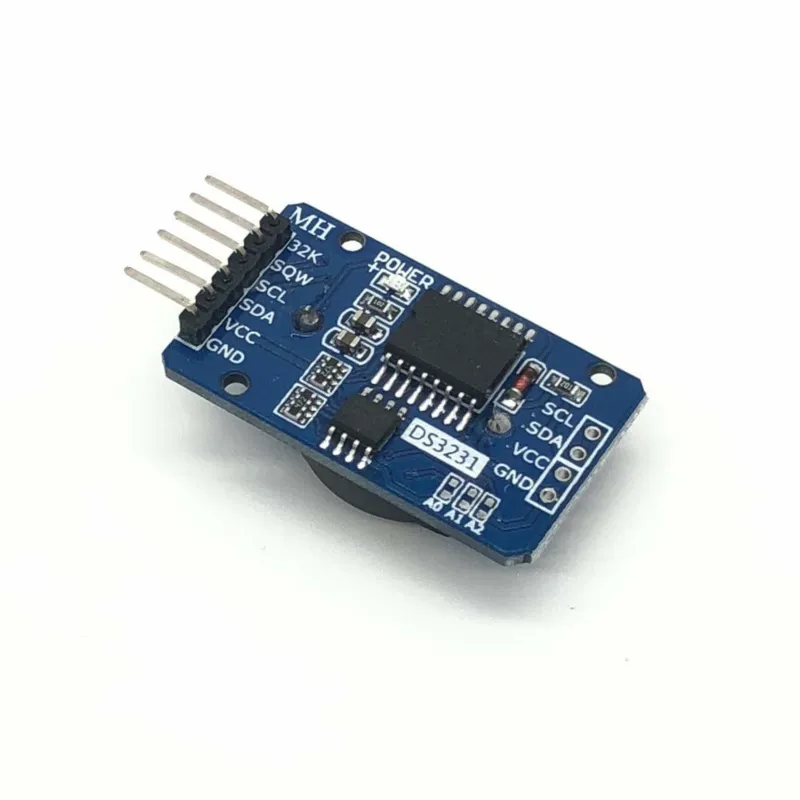
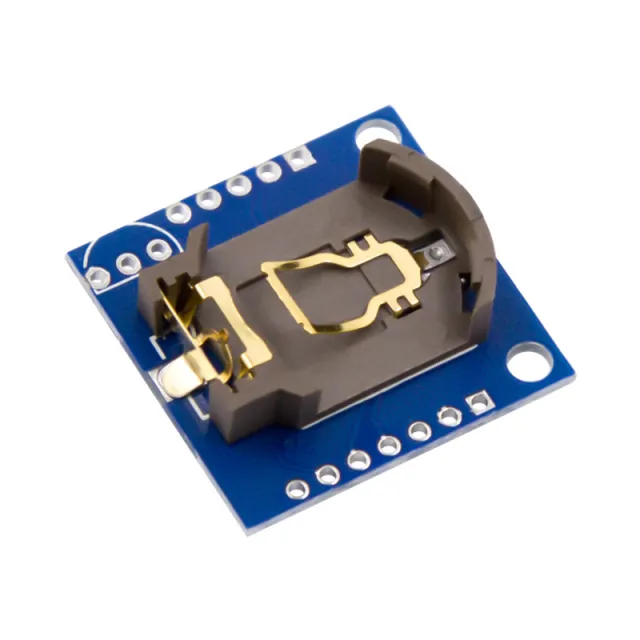
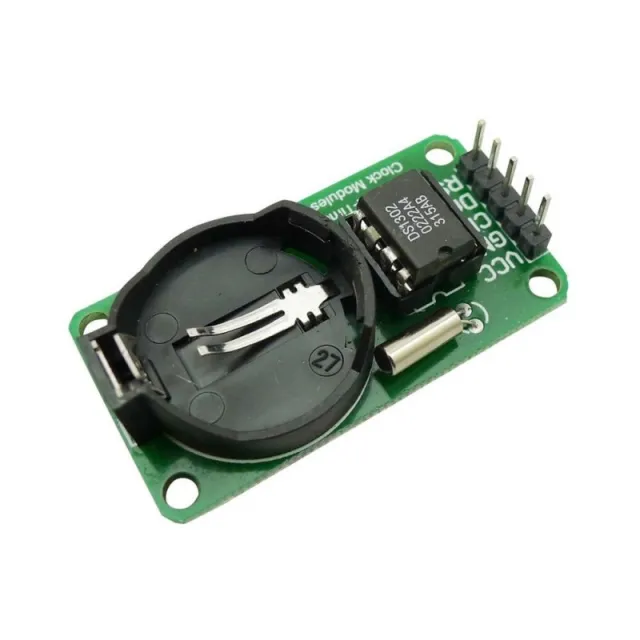
Real-Time-Clock-Modul mit dem DS3231-Chip (. Dieses Modul sorgt dafür, dass der Arduino jederzeit die exakte Uhrzeit kennt. Durch den Anschluss des Arduino an den ´sqw´-Pin ist es möglich, jede Sekunde einen Interrupt zu erzeugen, mit dem Sensorwerte oder ein Display angesprochen werden können.
Kommunikation: I2C interface.
Hält die Zeit genau ein, auch wenn das Modul nicht angeschlossen ist (Backup-Batterie)
Jahr - Monat - Tag Stunde : Minute : Sekunde
Anschluss für einen Trigger mit Intervall (1Hz, 4kHz, 8kHz, 32kHz)
56 Bytes Non-volatile memory
Größere Präzision als der DS1307
Zusätzlicher Speicherchip: AT24C32 (32K bytes)
Integrierter Temperatursensor (Abweichung von ±3 °C)
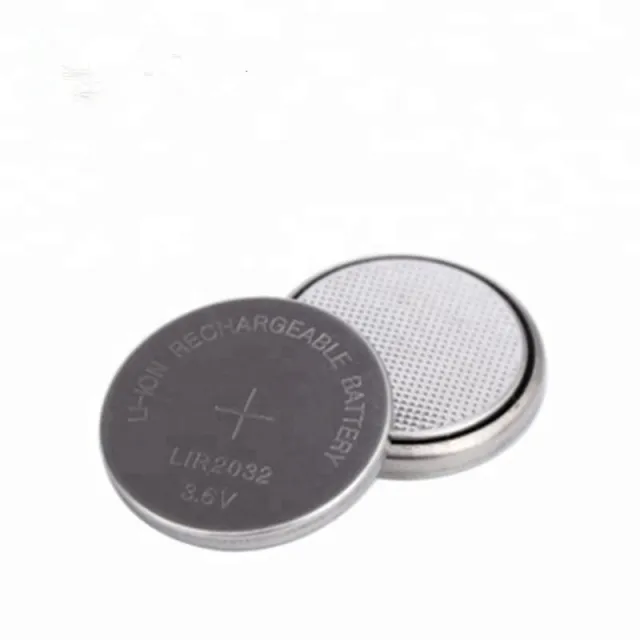
Wird geliefert ohne Batterie
Let op gebruik oplaadbare batterij LIR2032
Abmessungen
Lengte: 3,9cm
Breedte: 2,2cm
Hoogte: 1,2cm
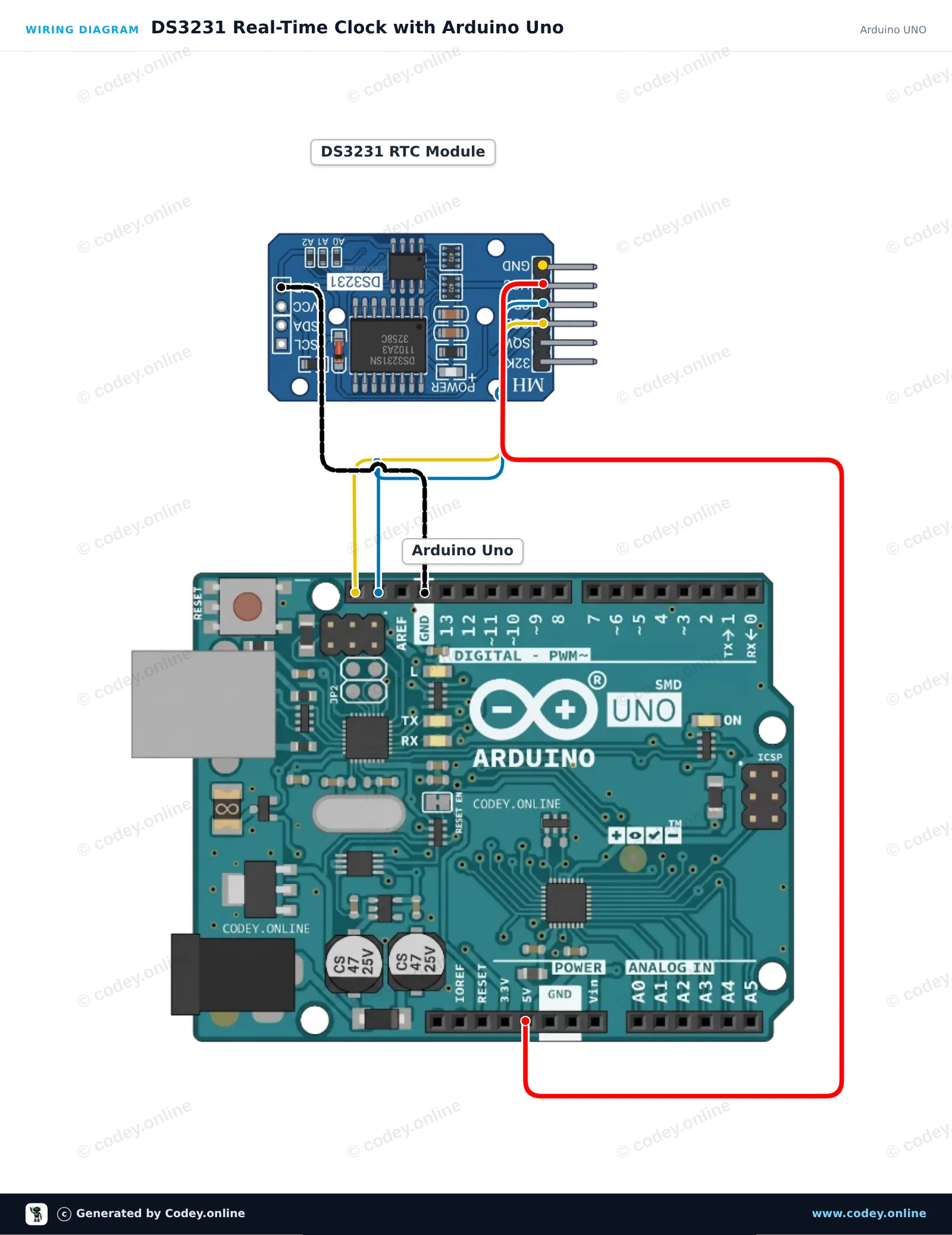
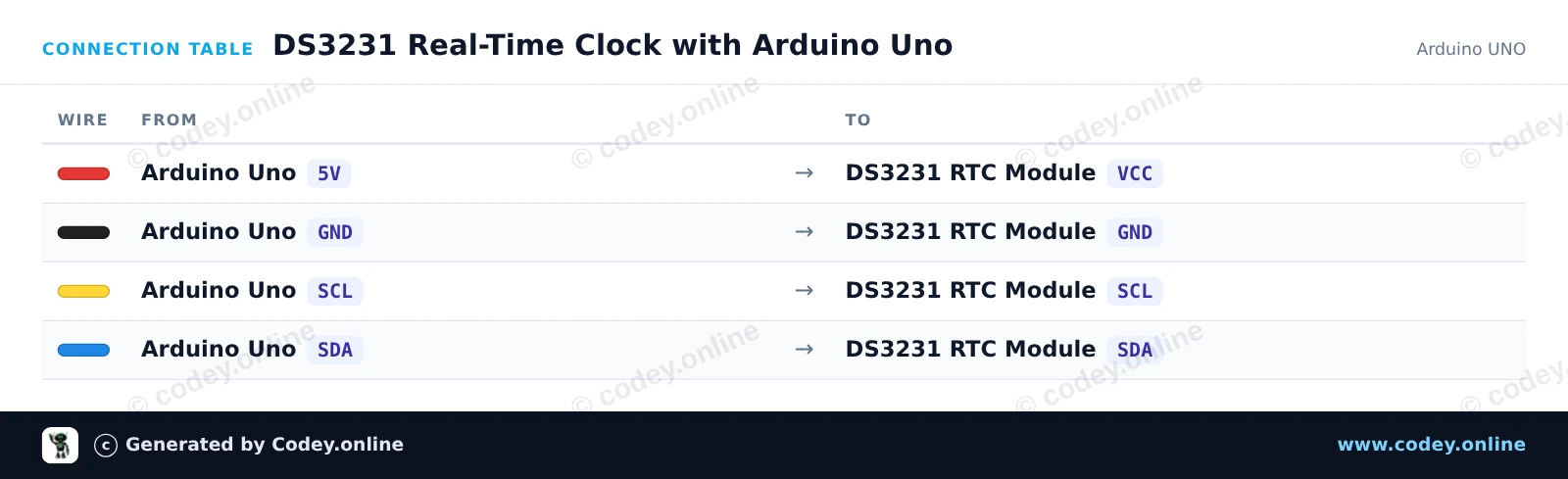
So schließt du den DS3231 Real Time Clock Module I2C (RTC hohe Präzision) an einen Arduino UNO oder ESP32 an, mit einem Beispiel-Sketch, den du direkt hochladen kannst.
Dieses Projekt verbindet ein hochpräzises DS3231-RTC-Modul über I2C mit einem Arduino Uno. Der Sketch stellt die RTC auf die Kompilierzeit ein, wenn die Stromversorgung ausgefallen war, und liest dann jede Sekunde das formatierte Datum, die Uhrzeit sowie die Messwerte des eingebauten Temperatursensors aus und gibt sie im Serial Monitor aus.
/*
 * ==================================================================
 *  Generated by Codey.online  —  https://www.codey.online
 * ==================================================================
 *  Project   : DS3231 Real-Time Clock with Arduino Uno
 *  Board     : Arduino UNO (arduino:avr:uno)
 *  Parts     : DS3231 Real Time Clock Module I2C
 *  Libraries : RTClib 2.1.4
 *
 *  Codey Online is an AI-powered browser IDE for Arduino and ESP32.
 *  Describe your project and Codey writes the code, draws the wiring
 *  diagram and uploads it to your board, straight from the browser.
 *  This code is free to use, modify and share, without warranty.
 * ==================================================================
 */

#include <Wire.h>
#include <RTClib.h>

RTC_DS3231 rtc;

void setup() {
  Serial.begin(115200);
  while (!Serial);

  if (!rtc.begin()) {
    Serial.println(F("Couldn't find DS3231 RTC"));
    while (1) delay(10);
  }

  if (rtc.lostPower()) {
    Serial.println(F("RTC lost power, setting time to compile time..."));
    rtc.adjust(DateTime(F(__DATE__), F(__TIME__)));
  }

  Serial.println(F("DS3231 RTC initialized."));
}

void loop() {
  DateTime now = rtc.now();

  char dateBuffer[11];
  char timeBuffer[9];
  snprintf(dateBuffer, sizeof(dateBuffer), "%04d-%02d-%02d", now.year(), now.month(), now.day());
  snprintf(timeBuffer, sizeof(timeBuffer), "%02d:%02d:%02d", now.hour(), now.minute(), now.second());

  Serial.print(F("Date: "));
  Serial.print(dateBuffer);
  Serial.print(F(" | Time: "));
  Serial.print(timeBuffer);
  Serial.print(F(" | Temp: "));
  Serial.print(rtc.getTemperature());
  Serial.println(F(" C"));

  delay(1000);
}Benötigte Bibliotheken: RTClib 2.1.4
Wiring diagram and example code generated by Codey.online — https://www.codey.online
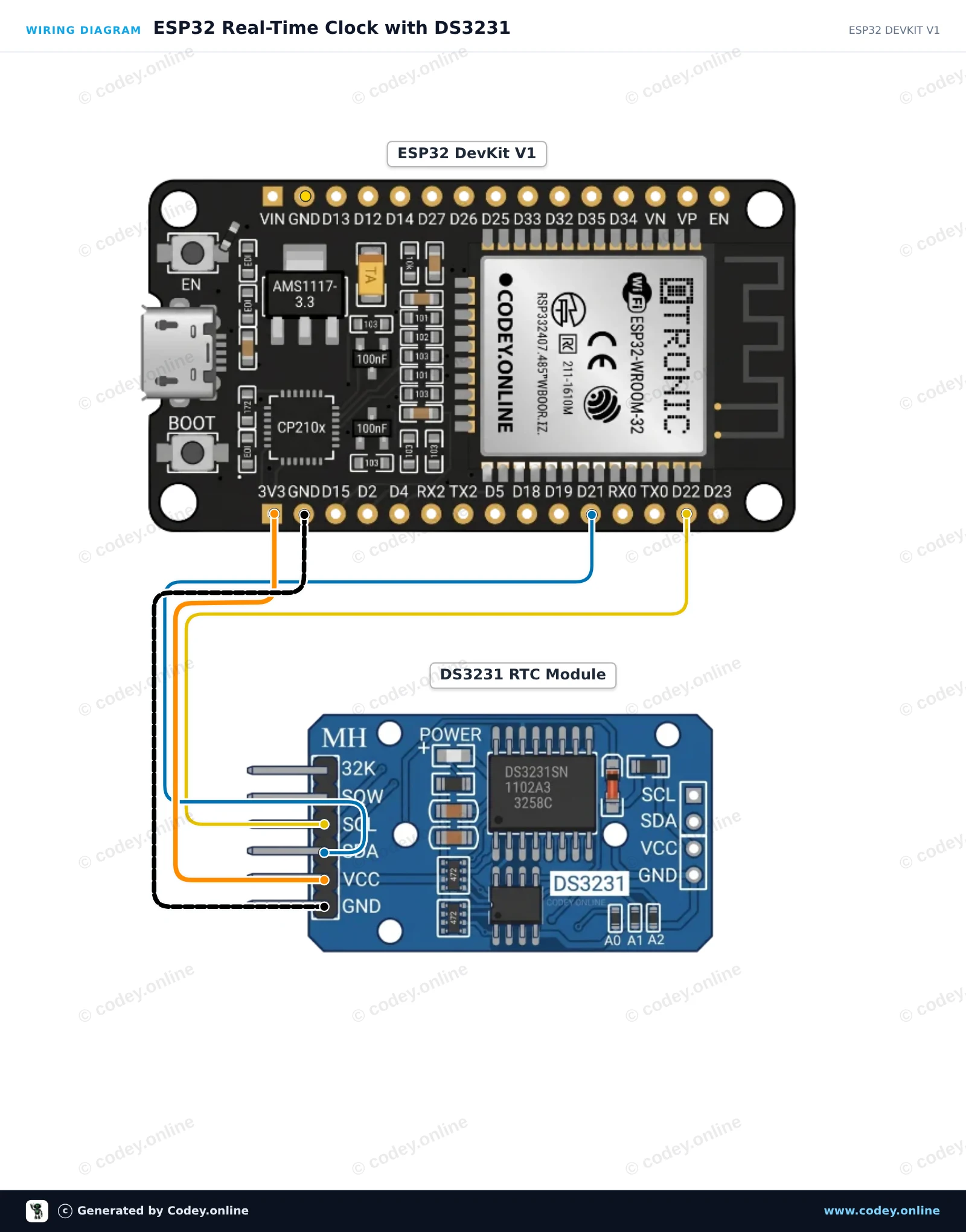
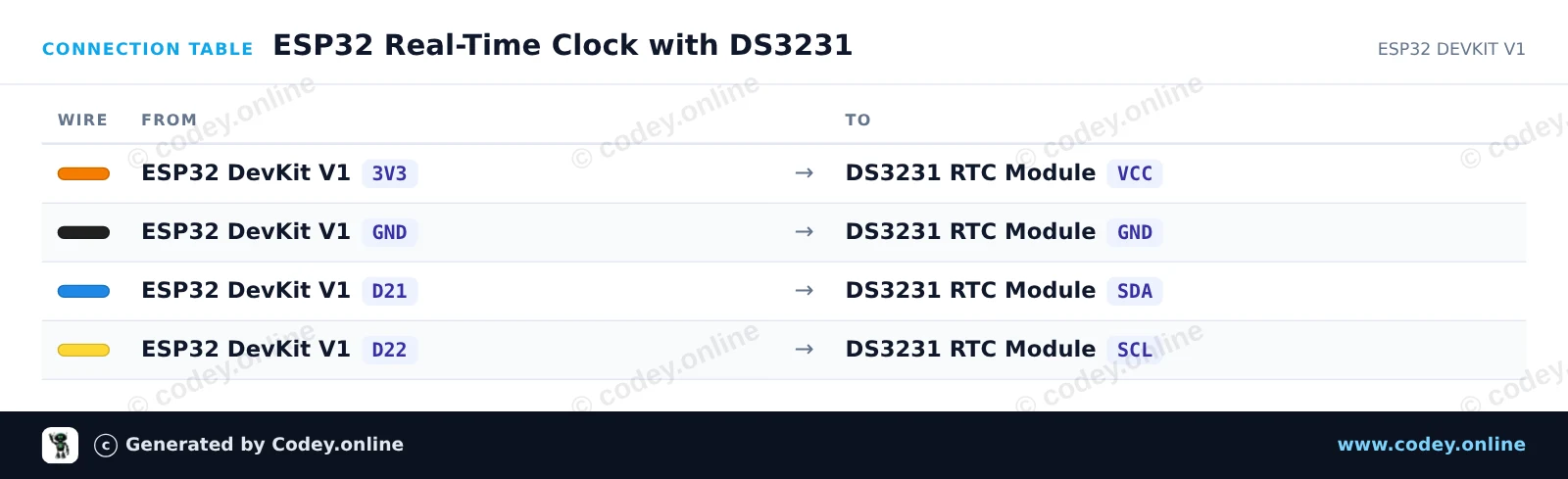
Dieses Projekt liest das aktuelle Datum, die Uhrzeit und die interne Temperatur des DS3231 Real Time Clock-Moduls über I2C aus. Verbinde das Modul mit der 3.3V-Schiene des ESP32 und den standardmäßigen I2C-Pins und öffne dann den Serial Monitor mit 115200 baud, um den aktuellen Zeitstempel anzuzeigen.
/*
 * ==================================================================
 *  Generated by Codey.online  —  https://www.codey.online
 * ==================================================================
 *  Project   : ESP32 Real-Time Clock with DS3231
 *  Board     : ESP32 DEVKIT V1 (esp32:esp32:esp32doit-devkit-v1)
 *  Parts     : DS3231 Real Time Clock Module I2C
 *  Libraries : RTClib 2.1.4
 *
 *  Codey Online is an AI-powered browser IDE for Arduino and ESP32.
 *  Describe your project and Codey writes the code, draws the wiring
 *  diagram and uploads it to your board, straight from the browser.
 *  This code is free to use, modify and share, without warranty.
 * ==================================================================
 */

#include <Wire.h>
#include "RTClib.h"

RTC_DS3231 rtc;

void setup() {
  Serial.begin(115200);
  while (!Serial) { delay(10); }

  Wire.begin(21, 22); // SDA = GPIO 21, SCL = GPIO 22

  if (!rtc.begin()) {
    Serial.println("Couldn't find DS3231 RTC module!");
    while (1) delay(10);
  }

  if (rtc.lostPower()) {
    Serial.println("RTC lost power, setting time to compilation time!");
    rtc.adjust(DateTime(F(__DATE__), F(__TIME__)));
  }
}

void loop() {
  DateTime now = rtc.now();

  char buffer[30];
  snprintf(buffer, sizeof(buffer), "%04d-%02d-%02d %02d:%02d:%02d",
           now.year(), now.month(), now.day(),
           now.hour(), now.minute(), now.second());

  Serial.print("Current Time: ");
  Serial.print(buffer);
  Serial.print(" | Temp: ");
  Serial.print(rtc.getTemperature());
  Serial.println(" °C");

  delay(1000);
}Benötigte Bibliotheken: RTClib 2.1.4
Wiring diagram and example code generated by Codey.online — https://www.codey.online






 English
  Nederlands
  Frans
Frans  Italiano
  Español
  Suomi
Suomi  Polski
  Dansk
Dansk  Ελληνικά
  Български
  Čeština
  Hrvatski
  Aileen